24 hours pass and you can’t write
A customer asked on Monday and on Wednesday you want to tell them their item arrived. WhatsApp won’t let you unless you use an approved template, and hardly anyone knows how to make one.
Your WhatsApp on Meta’s official connection, in your business’s name, with approved templates.
Monday · 5:40 pm
Hi, do you have 7.5 kg food for neutered cats?
Hi! That food is $ 38,500, but we’re out today. If you’d like, I’ll ask the team to message you when it comes in.
Yes, please
Done, I’ve let them know. They’ll message you here.
Wednesday · 10:15 am
More than 24 h passed · an approved template goes out
Hi Sofía, what you were waiting for is in: we’ll hold it for you until Friday. Demo Vet.
Great! I’ll stop by this afternoon.
Sample conversation, with made-up data.
With the official WhatsApp Business API, the number and the account are in your business’s name, under your own Meta account, and the Vende con IA AI agent answers there. You connect it from the dashboard with a step-by-step guide, and the Icono team walks you through it.
The WhatsApp Business API is Meta’s official connection that lets companies run their WhatsApp from a platform like Vende con IA. The number and account stay in the business’s name and Meta bills its messages directly; once 24 hours have passed since a customer’s last message, you can only write to them with a Meta-approved template. Icono recommends it because it lowers certain risks, though nobody can guarantee what Meta decides.
A customer asked on Monday and on Wednesday you want to tell them their item arrived. WhatsApp won’t let you unless you use an approved template, and hardly anyone knows how to make one.
If someone else set up the account, the day something breaks you don’t know whose name it’s in or who can log in to fix it.
Sales on one number, the branch on another: each lives on a different phone and nobody sees the whole picture.
Business portfolio, Meta app, token, webhook: the first time you read it, it feels impossible to set up on your own.
The owner, with two-factor authentication on, connects it in Connections → Official WhatsApp following “How to connect WhatsApp in Meta”, step by step. And the Icono team walks you through onboarding.
The WhatsApp Business number and account are yours, with your Meta account and your card. Meta bills its messages to you directly.
In Templates you tell the AI what you want to say (“let them know the order is ready”) and it drafts it following Meta’s rules. Meta approves it (green) or rejects it with a reason (red).
From the conversation, send an approved template by filling in its details, or send it on its own to a contact or a phone number.
Connect more than one number and the same agent answers all of them, with the same information. They share your reply quota with your website.
With the official API you can also send an approved template to many contacts at once, at the pace you choose and with a report.
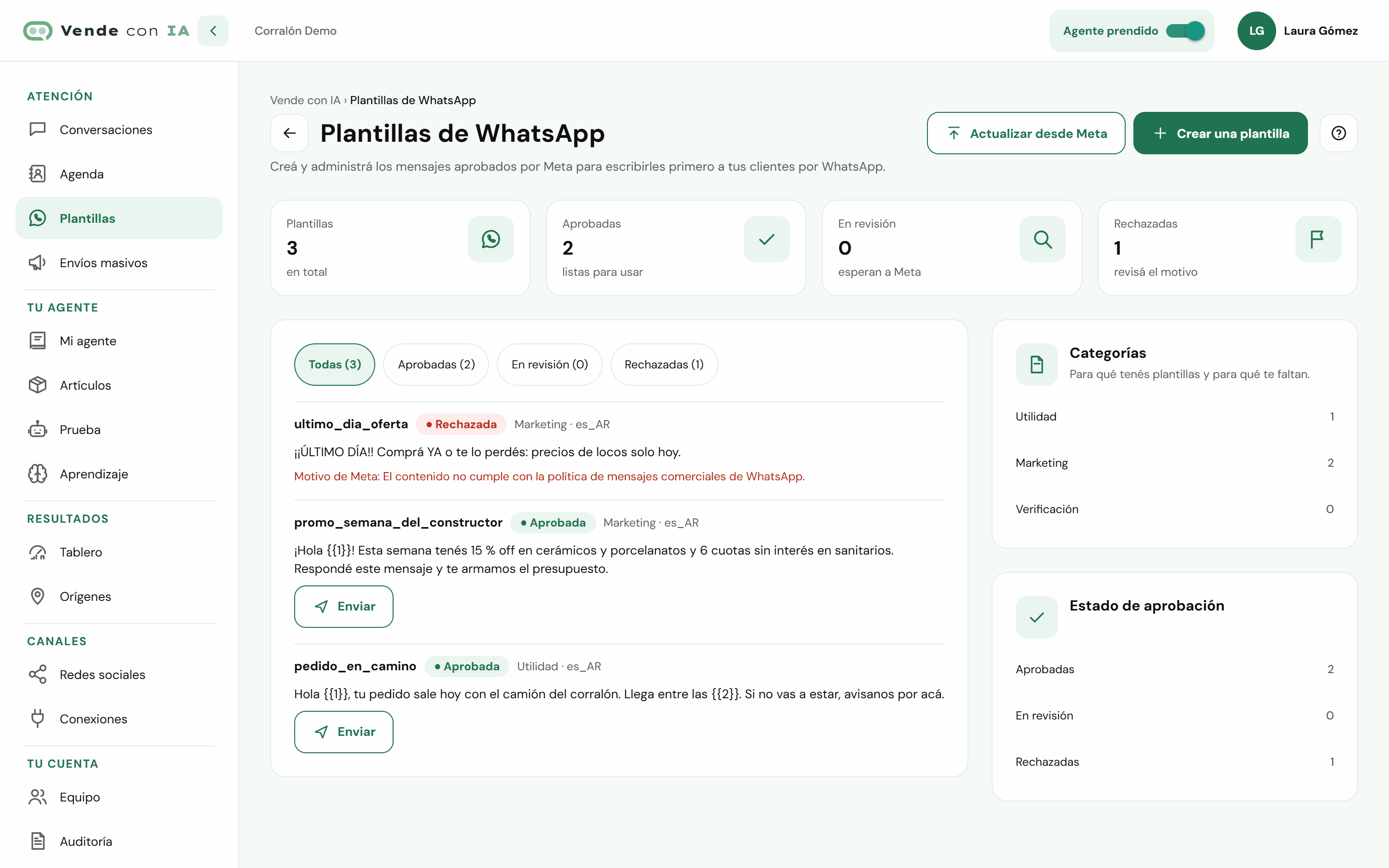
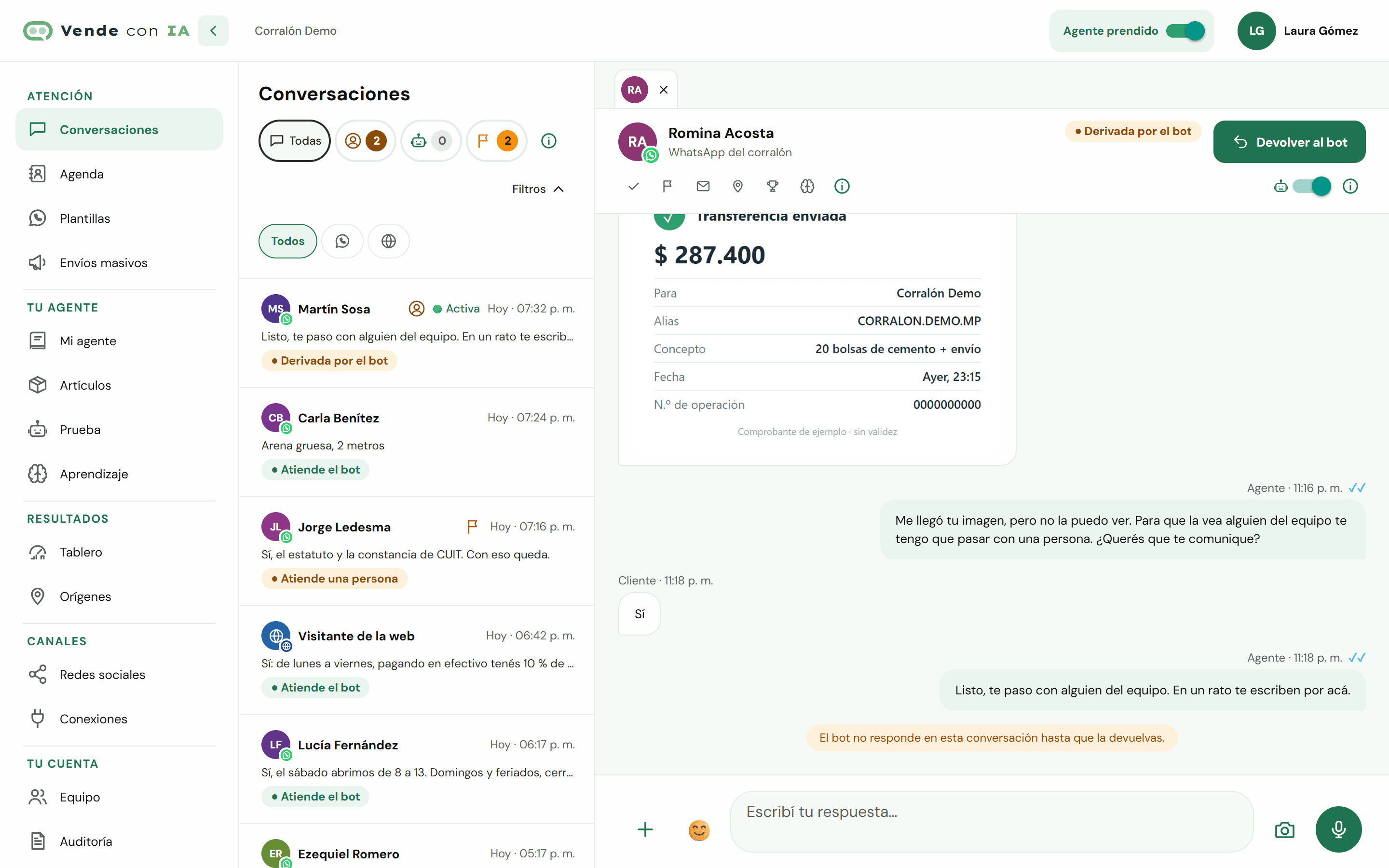
Screenshots of the Vende con IA dashboard with a made-up business.
You teach it about your business in "My agent" (typing, dictating or with your documents and your price list), we connect your WhatsApp, Instagram, Facebook or website with you during onboarding, and you test it before opening it to your customers.
See how it worksYou pay for the replies the agent gives, not per conversation or per message received. Plans with published prices, in Argentine pesos and taxes included.
See pricing and sign upIt’s Meta’s official connection that lets a company run its WhatsApp from a platform instead of a phone. With Vende con IA, the AI agent and your team answer that number from the dashboard, each from their own phone or computer.
You connect it in Connections → Official WhatsApp, with the dashboard’s step-by-step guide (the owner does it, with two-factor authentication on), and the Icono team walks you through onboarding. You need a Meta business portfolio with your business details and a card for Meta to bill its messages. The same Meta account also connects your Instagram account and your Facebook Page.
There’s no guarantee: Meta makes the decisions about numbers, and Icono doesn’t control them. The official API lowers certain risks, and it also helps to have a well-configured portfolio, real details and two-step verification. The details are in section 16 of the terms.
Your business pays Meta directly for its charges, with the card on your account: it isn’t included in the Vende con IA price. Meta charges for each template sent, and more for marketing templates than for utility ones.
Hardly anything: they answer from Conversations as usual and can have several numbers in the same dashboard. Two differences: once 24 hours have passed since the customer’s last message, you write with an approved template, and sent messages can’t be edited or deleted, because Meta doesn’t allow it.