A phone passed from hand to hand
The business WhatsApp lives on one phone, and whoever doesn’t have it can’t answer.
Your whole team on the same WhatsApp, each from their own phone, with the agent answering.
Hi, how much is a case of 1.5 L cooking oil?
Hi! The case of 12 is $ 41,900. Which area would delivery be to?
Moreno. And I’d like to open a credit account, I run a grocery store
Delivery to Moreno is $ 5,500 and takes 48 h. The sales team handles credit accounts: I’m letting them know.
Waiting for a person · the whole team got the alert
Martín took over the conversation
Hi, this is Martín from sales. I’ll send you what we need to open your credit account.
Sample conversation, with made-up data.
When several people serve customers, one phone isn’t enough and nobody knows who answered what. With Vende con IA the whole team sees and answers the same conversations live, each from their own phone or computer, while the AI agent takes care of the usual questions.
A shared WhatsApp inbox lets several people use the same WhatsApp number, each from their own phone or computer. With Vende con IA your whole team sees and answers the same conversations live, with their own login and permissions, while the AI agent handles the usual questions.
The business WhatsApp lives on one phone, and whoever doesn’t have it can’t answer.
Two salespeople answer the same thing, or nobody does because each thought the other was on it.
Price, hours, delivery, payment methods: a big part of the team’s time goes into answering the same thing over and over.
When many come in at once, the team takes longer and longer to reply and customers are left waiting.
You invite each person by email and they log in to the Vende con IA app from their phone or computer. No need to install WhatsApp or share a phone.
In Conversations the team sees WhatsApp, Instagram, Facebook and website chats as they happen, with filters for the ones waiting for a person and the ones the agent is handling.
Anyone on the team takes over a conversation with one tap and the agent stops answering in it. When they’re done, they can hand it back to the agent.
In Team you choose what each person can do: conversations, business knowledge, promotions, plan and billing, team and more. You can pause or remove someone.
When a customer asks to talk to a person, every phone on the team gets a notification with sound: whoever is free takes it.
The Audit log records changes, documents and conversations taken over. And you can connect several WhatsApp numbers, your Instagram, your Facebook and your website, all answered by the same agent.
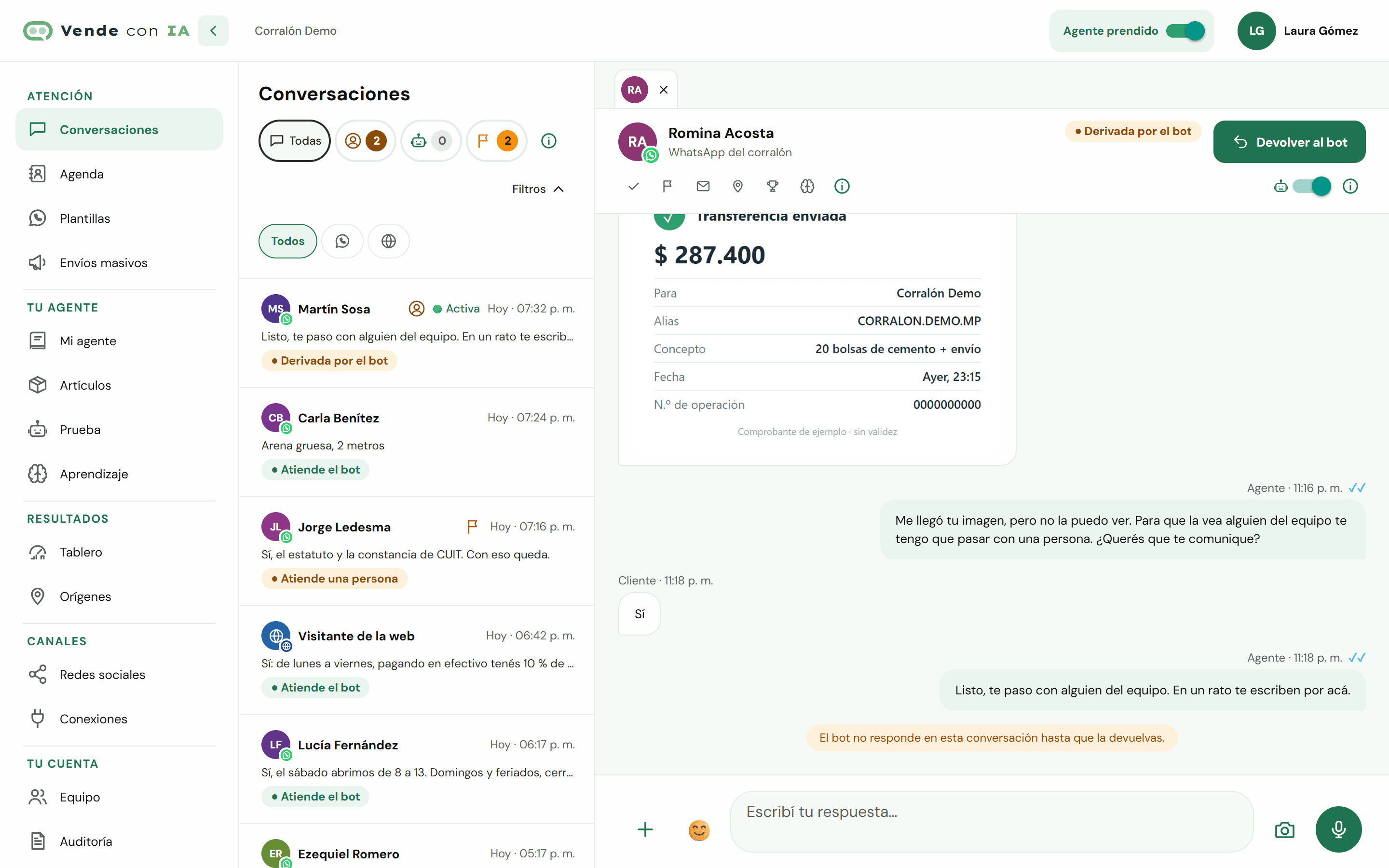
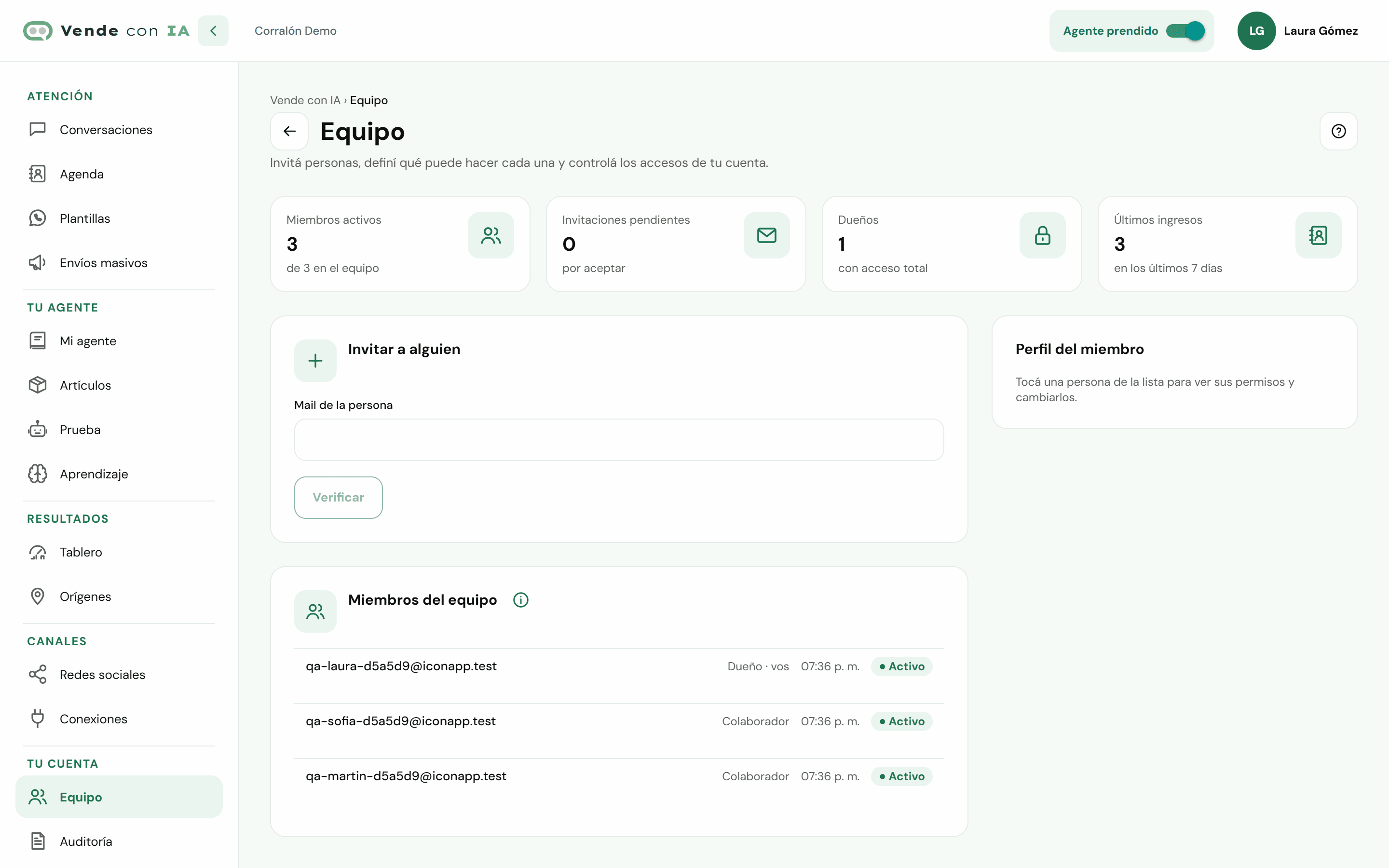
Screenshots of the Vende con IA dashboard with a made-up business.
You teach it about your business in "My agent" (typing, dictating or with your documents and your price list), we connect your WhatsApp, Instagram, Facebook or website with you during onboarding, and you test it before opening it to your customers.
See how it worksYou pay for the replies the agent gives, not per conversation or per message received. Plans with published prices, in Argentine pesos and taxes included.
See pricing and sign upYes. With Vende con IA each person on the team logs in with their own user from their phone or computer, and everyone sees and answers the same number’s conversations at once. No need to share a phone or install WhatsApp.
When someone takes over a conversation from the dashboard, the agent stops answering in it and the Audit log records who took it. The whole team sees conversations live.
Yes. In Team you choose each member’s permissions: conversations, business knowledge, delivery zones, promotions and campaigns, plan and usage, team and more. With every permission, they can do the same as an owner.
It answers the usual questions (prices, hours, delivery, payment methods and stock, if you included it in your list) and hands the team anything that needs a person. You choose the agent’s hours and can take over any conversation whenever you want.