Details typed from memory
Someone types them in a hurry, one character slips and the transfer bounces or goes to the wrong account. And the customer is left wondering.
The agent shares your transfer details, the customer sends the receipt and your team confirms it.
Hi! I want 3 size 30 terracotta pots and a 50 L bag of potting soil. Can you send me the transfer details?
Hi! The 3 pots are $ 27,000 and the potting soil is $ 14,500: total $ 41,500. Alias: VIVERO.DEMO.EJEMPLO · Account holder: Vivero Demo. Once you transfer, send the receipt here.
📎 Receipt.jpg
I got your image, but I can’t see it. So someone on the team can check it, I’ll pass you to a person, okay?
Yes, please
Waiting for a person · receipt to confirm
Laura took over the conversation
Hi, this is Laura from the nursery. I see your $ 41,500 transfer: your order is ready for pickup.
Sample conversation, with made-up data.
Collecting payments on WhatsApp means sending your details, waiting for the receipt and confirming the payment, many times a day. Vende con IA sends your bank transfer details exactly as you entered them, at any hour, and when the receipt comes in it hands the conversation to your team to check and confirm from the dashboard.
To collect payments on WhatsApp without mistakes, the AI agent sends customers your exact bank transfer details, copied from “Business details”, along with the total and your payment methods. When the customer sends the receipt, the agent doesn’t read it: it offers to pass them to a person and your team confirms it from the dashboard. Payment links can be added as a custom integration, quoted separately.
Someone types them in a hurry, one character slips and the transfer bounces or goes to the wrong account. And the customer is left wondering.
The customer wants to pay now, but nobody sends the account details until someone picks up the phone.
Screenshots arrive mixed in with photos, voice notes and questions, and nobody knows which ones were already checked.
If someone with access swaps the transfer account, you find out when the money doesn’t arrive.
On WhatsApp, in Instagram and Facebook DMs or in your website chat, at any hour. The agent explains your payment methods and, if they want to pay by transfer, sends the details.
It shares your bank transfer details copied from “Business details”, never from memory, with the total it knows: prices from your list, delivery to their area and current promotions.
The agent doesn’t read images: it says it can’t see it and offers to pass them to a person.
If they say yes, the conversation moves to “Waiting for a person” and every phone on the team gets a notification with sound.
Someone opens the conversation, checks the receipt and replies to the customer from their phone or computer. The red flag shows everyone else who is handling it.
If someone changes the bank transfer details, the owners are notified and it’s recorded in the Audit log. And “bank transfer details” is a separate permission: you choose who on the team can edit them.
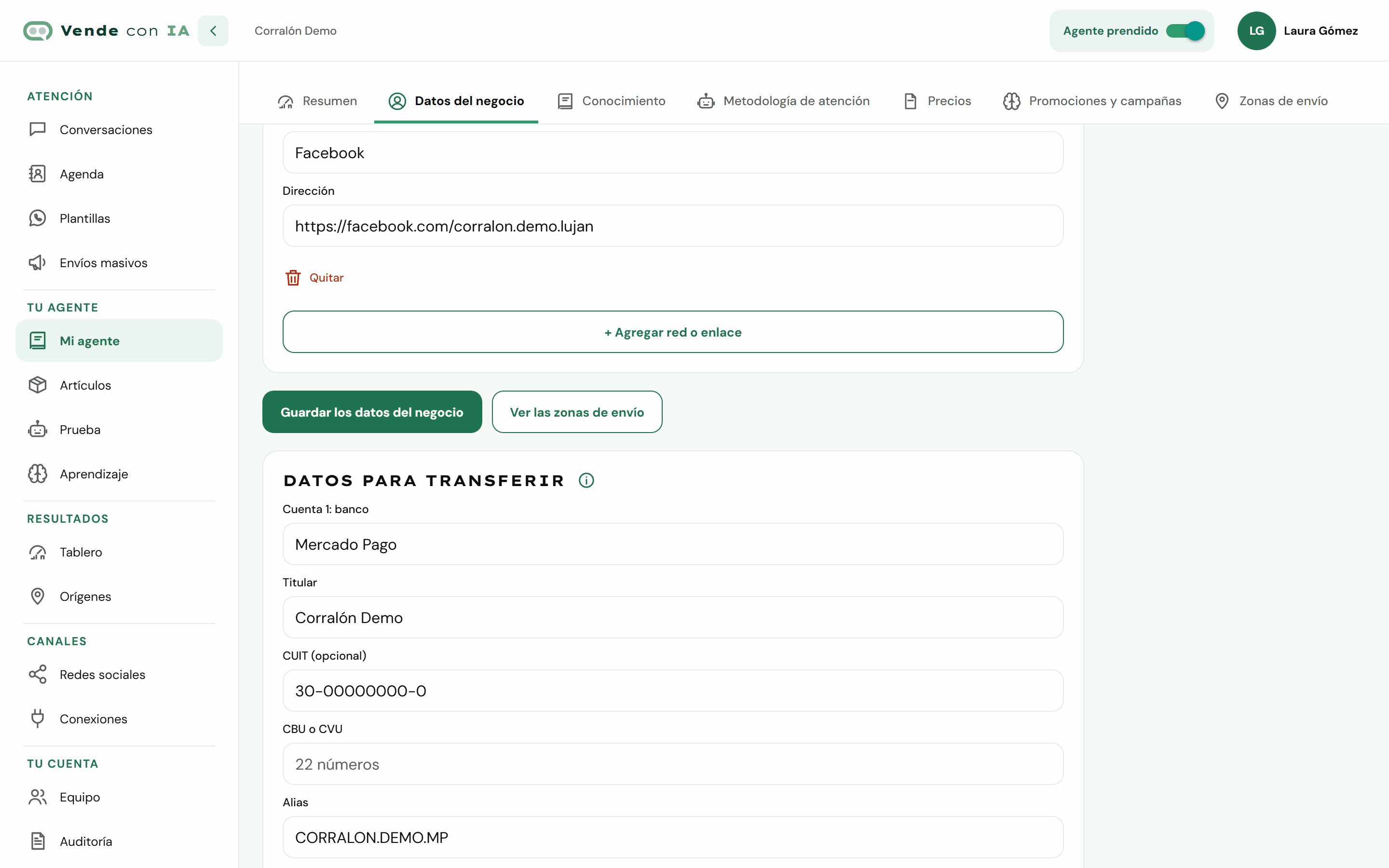
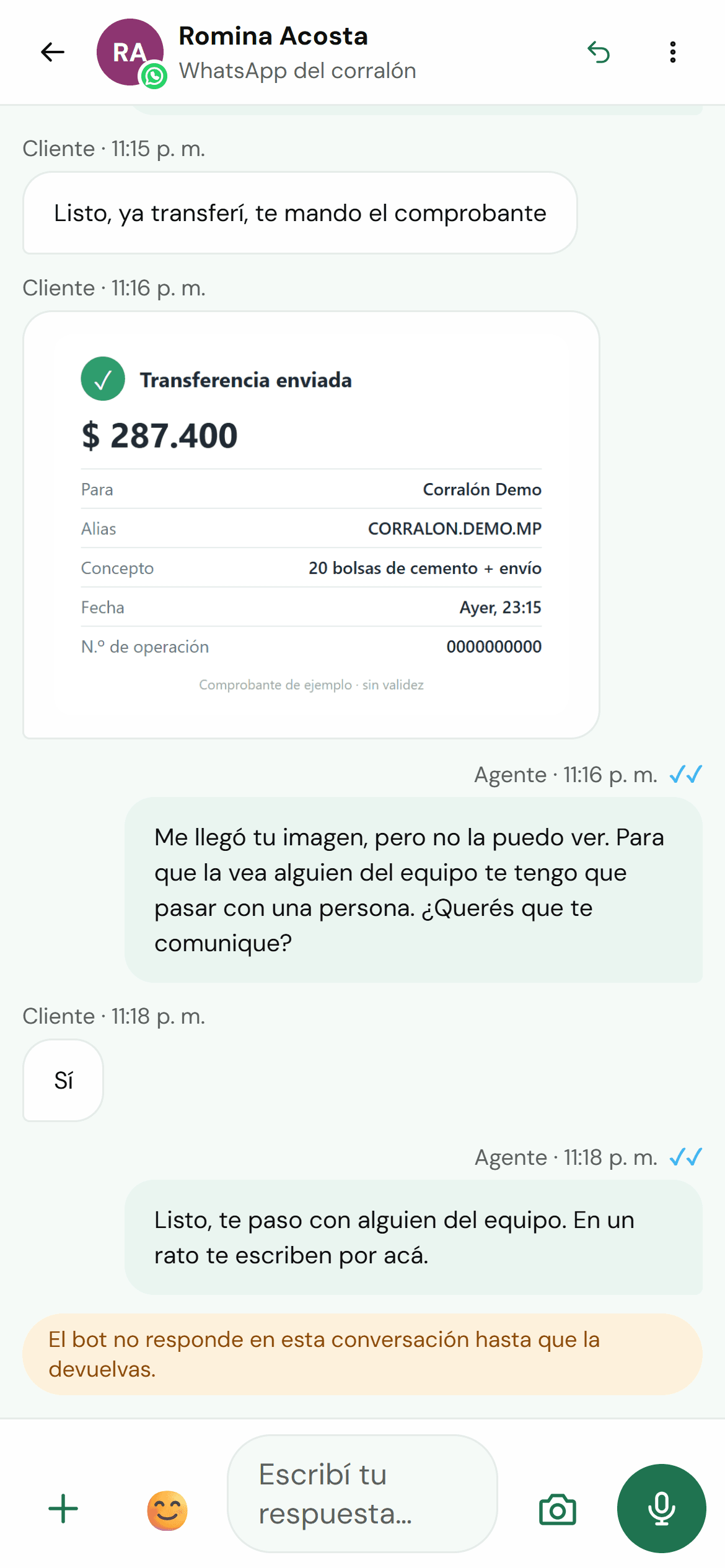
Screenshots of the Vende con IA dashboard with a made-up business.
You teach it about your business in "My agent" (typing, dictating or with your documents and your price list), we connect your WhatsApp, Instagram, Facebook or website with you during onboarding, and you test it before opening it to your customers.
See how it worksYou pay for the replies the agent gives, not per conversation or per message received. Plans with published prices, in Argentine pesos and taxes included.
See pricing and sign upYou enter your bank transfer details once, in My agent → Business details, and the agent copies them exactly every time a customer wants to pay: never from memory. If you have more than one account, you add each one with its bank, account holder and details.
It isn’t included. It can be added as a custom integration built by Icono: the agent connects live to your payment platform (for example, Mercado Pago) or your business system and sends the customer the payment link. It’s quoted separately; you request it through the sales WhatsApp.
No. The agent doesn’t read images: when the customer sends the receipt, it says it can’t see it and offers to pass them to a person. If they say yes, the conversation goes to your team with an alert and the receipt stays in the conversation, in the dashboard, for someone to check and confirm the payment.
The agent shares exactly the details you entered, copied as they are. Every time someone changes them, the business owners are notified and it’s recorded in the Audit log. Plus, “bank transfer details” is a separate permission: you choose who on the team can edit them.
In Conversations, the “Waiting for a person” filter shows the chats left for the team, including the ones with a receipt. When someone takes one, the red flag shows everyone else who has it (it releases itself after 24 hours), so the team knows who is handling each payment.